Use Databricks Models with VS Code Copilot and Copilot CLI
How to use one local proxy to connect Databricks Model Serving to both VS Code Copilot Custom Endpoint and GitHub Copilot CLI.
On this page 8 sections
I wanted one Databricks-hosted model to work in two developer surfaces:
- VS Code Copilot Chat, through the Custom Endpoint / BYOK model picker.
- GitHub Copilot CLI, through provider environment variables.
Both surfaces can speak an OpenAI-style Chat Completions protocol. Databricks Model Serving also exposes foundation models through an OpenAI-compatible interface, but the details do not line up perfectly out of the box.
The practical solution is a small local proxy.
Why I Needed a Local Proxy
The target Databricks endpoint is a Model Serving invocation URL:
https://<workspace-hostname>/serving-endpoints/<endpoint-name>/invocationsVS Code’s Custom Endpoint provider expects a model endpoint it can call as Chat Completions. In practice, pointing VS Code directly at Databricks creates two rough edges:
- The client-side path and the Databricks invocation path are not the same shape.
- Some Claude-backed Databricks endpoints reject requests that include both
temperatureandtop_p.
The proxy gives both tools a simple local target:
http://localhost:19000It then forwards the request to Databricks with the right URL, authentication header, and request body.
Shared Architecture
Both integrations use the same flow:
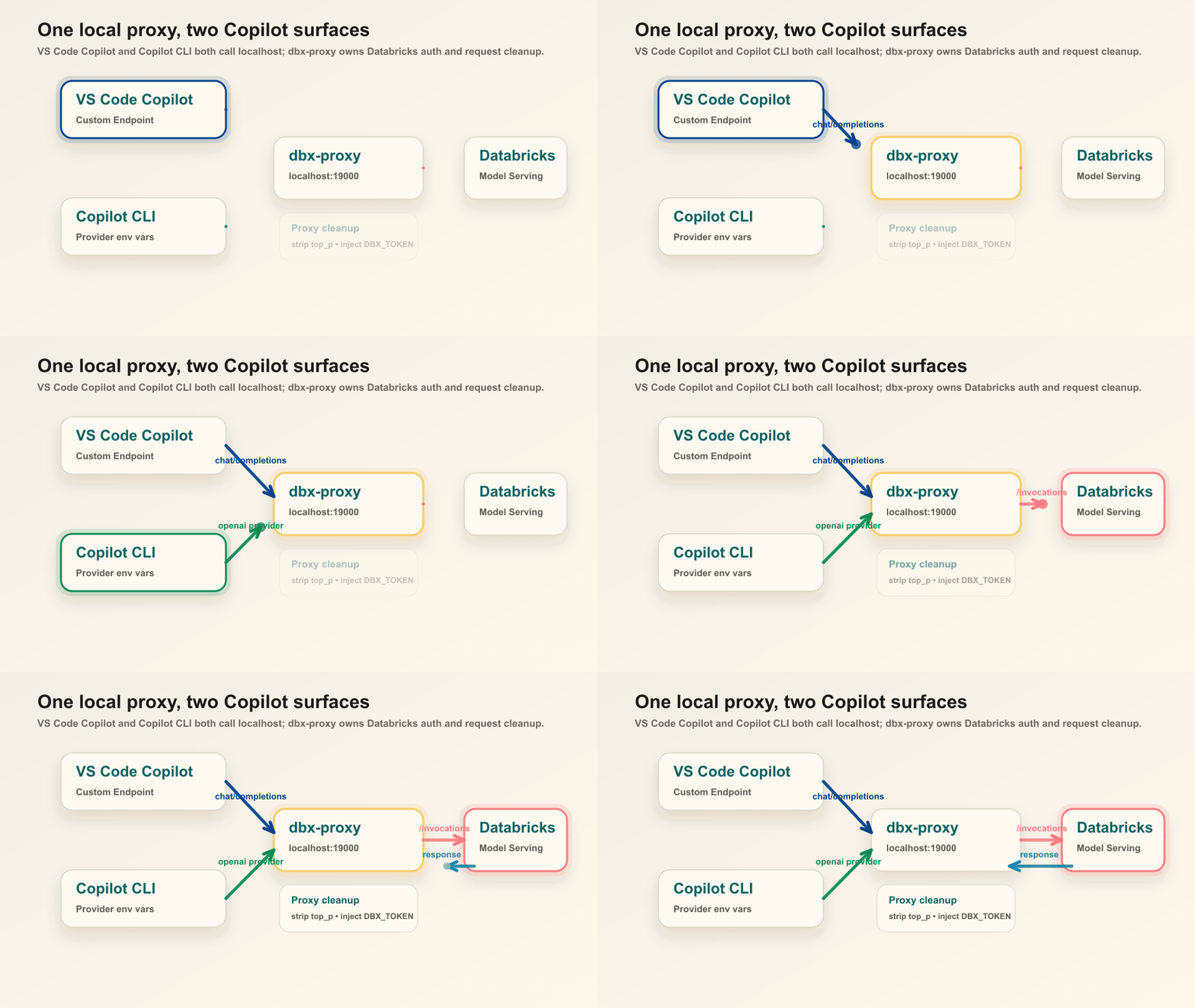
The proxy does four jobs:
- Reads
DBX_WORKSPACE_HOST,DBX_ENDPOINT,DBX_MODEL,DBX_TOKEN, andDBX_PROXY_PORTfrom the environment. - Converts local Chat Completions requests into Databricks Model Serving invocation requests.
- Removes
top_pwhentemperatureis present. - Sends
Authorization: Bearer <DBX_TOKEN>to Databricks.
The corrected proxy keeps secrets out of the source file. A local .env can look like this:
DBX_WORKSPACE_HOST=<workspace-hostname>
DBX_ENDPOINT=<endpoint-name>
DBX_MODEL=<endpoint-name>
DBX_PROXY_PORT=19000
Keep the token in your shell profile or secret manager:
export DBX_TOKEN=dapi...Part 1: VS Code Copilot Custom Endpoint
VS Code supports bringing your own model through the Custom Endpoint provider. For Databricks Model Serving, the important settings are:
vendor: customendpointapiType: chatcompletionsurl: http://localhost:19000
The URL points to the local proxy, not directly to Databricks.
Use this shape in ~/Library/Application Support/Code/User/chatLanguageModels.json:
[
  {
    "name": "Databricks",
    "vendor": "customendpoint",
    "apiKey": "proxy",
    "apiType": "chatcompletions",
    "models": [
      {
        "id": "<endpoint-name>",
        "name": "Databricks Claude Sonnet",
        "url": "http://localhost:19000",
        "toolCalling": true,
        "vision": true,
        "maxInputTokens": 128000,
        "maxOutputTokens": 16000,
        "temperature": 0.1
      }
    ]
  }
]
apiKey is only a placeholder for VS Code. The real Databricks credential stays in DBX_TOKEN and is injected by the proxy.
After saving the file, reload VS Code and select the Databricks model from the model picker. If the model does not appear, check that the model supports tool calling and restart VS Code.
Part 2: GitHub Copilot CLI
The second path is terminal-based. The helper script configures Copilot CLI to call the same local proxy:
source ./dbx-copilot-cli.sh
copilot "explain this workspace"
The script exports:
export COPILOT_PROVIDER_TYPE=openai
export COPILOT_PROVIDER_BASE_URL=http://localhost:19000
export COPILOT_PROVIDER_API_KEY=proxy
export COPILOT_MODEL=<endpoint-name>
export COPILOT_PROVIDER_MAX_PROMPT_TOKENS=128000
export COPILOT_PROVIDER_MAX_OUTPUT_TOKENS=16000
This is the same idea as the VS Code setup:
- Copilot CLI talks to
localhost:19000. - The proxy talks to Databricks.
- The CLI never needs the Databricks PAT directly.
I could not verify this part on the current machine because the copilot binary is not installed locally. The environment variable pattern comes from the handwritten setup and local VS Code history, so treat the CLI section as the path to re-test when Copilot CLI is available.
macOS Launchd Service Setup
The cleaned-up local folder includes three helper scripts:
install.shwrites.env, generates a LaunchAgent plist, and starts the proxy.dbx-proxy-wrapper.shloads~/.zshrcplus local.env, then runs the Python proxy.dbx-proxy-service.shmanagesstart,stop,restart,status, andlog.
The full script contents are collapsed below so the main article stays readable.
dbx-proxy.py
#!/usr/bin/env python3
"""Local Chat Completions proxy for Databricks Model Serving."""

from __future__ import annotations

import json
import os
import ssl
import sys
import urllib.error
import urllib.request
from http.server import BaseHTTPRequestHandler, ThreadingHTTPServer
from typing import Any


DEFAULT_PORT = 19000


def env(name: str, default: str | None = None) -> str | None:
    value = os.environ.get(name)
    return value.strip() if value and value.strip() else default


def databricks_url() -> str:
    explicit_url = env("DATABRICKS_URL")
    if explicit_url:
        return explicit_url.rstrip("/")

    host = env("DBX_WORKSPACE_HOST")
    endpoint = env("DBX_ENDPOINT")
    if not host or not endpoint:
        raise RuntimeError(
            "Set DBX_WORKSPACE_HOST and DBX_ENDPOINT, or set DATABRICKS_URL."
        )

    host = host.removeprefix("https://").removeprefix("http://").rstrip("/")
    return f"https://{host}/serving-endpoints/{endpoint}/invocations"


def proxy_port() -> int:
    try:
        return int(env("DBX_PROXY_PORT", str(DEFAULT_PORT)) or DEFAULT_PORT)
    except ValueError as exc:
        raise RuntimeError("DBX_PROXY_PORT must be an integer.") from exc


TOKEN = env("DBX_TOKEN")
ENDPOINT = env("DBX_ENDPOINT")
MODEL = env("DBX_MODEL", ENDPOINT)
TARGET_URL = databricks_url()
PORT = proxy_port()
TIMEOUT_SECONDS = int(env("DBX_PROXY_TIMEOUT_SECONDS", "300") or "300")


def build_opener() -> urllib.request.OpenerDirector:
    """Build an opener that bypasses system proxies for Databricks traffic."""
    insecure = env("DBX_INSECURE_SKIP_VERIFY", "0") in {"1", "true", "yes"}
    context = ssl.create_default_context()
    if insecure:
        context.check_hostname = False
        context.verify_mode = ssl.CERT_NONE

    return urllib.request.build_opener(
        urllib.request.ProxyHandler({}),
        urllib.request.HTTPSHandler(context=context),
    )


OPENER = build_opener()


class DatabricksProxy(BaseHTTPRequestHandler):
    server_version = "dbx-proxy/1.0"

    def log_message(self, fmt: str, *args: Any) -> None:
        print(f"{self.address_string()} - {fmt % args}", flush=True)

    def send_json(self, status: int, payload: dict[str, Any]) -> None:
        data = json.dumps(payload).encode("utf-8")
        self.send_response(status)
        self.send_header("Content-Type", "application/json")
        self.send_header("Content-Length", str(len(data)))
        self.end_headers()
        self.wfile.write(data)

    def do_GET(self) -> None:
        if self.path in {"/", "/healthz"}:
            self.send_json(200, {"status": "ok", "target": TARGET_URL})
            return
        self.send_json(404, {"error": f"Unsupported path: {self.path}"})

    def do_POST(self) -> None:
        if not TOKEN:
            self.send_json(500, {"error": "DBX_TOKEN is not set."})
            return

        try:
            length = int(self.headers.get("Content-Length", "0"))
            raw = self.rfile.read(length)
            body = json.loads(raw or b"{}")
        except json.JSONDecodeError as exc:
            self.send_json(400, {"error": f"Invalid JSON request body: {exc}"})
            return

        if not isinstance(body, dict):
            self.send_json(400, {"error": "Request body must be a JSON object."})
            return

        body = self.normalize_request(body)
        print(
            f"REQUEST path={self.path} stream={body.get('stream', False)} "
            f"model={body.get('model')}",
            flush=True,
        )

        request = urllib.request.Request(
            TARGET_URL,
            data=json.dumps(body).encode("utf-8"),
            headers={
                "Authorization": f"Bearer {TOKEN}",
                "Content-Type": "application/json",
                "Accept": self.headers.get("Accept", "application/json"),
            },
            method="POST",
        )

        try:
            with OPENER.open(request, timeout=TIMEOUT_SECONDS) as response:
                result = response.read()
                content_type = response.headers.get("Content-Type", "application/json")
                self.send_response(response.status)
                self.send_header("Content-Type", content_type)
                self.send_header("Content-Length", str(len(result)))
                self.end_headers()
                self.wfile.write(result)
        except urllib.error.HTTPError as exc:
            result = exc.read()
            content_type = exc.headers.get("Content-Type", "application/json")
            self.send_response(exc.code)
            self.send_header("Content-Type", content_type)
            self.send_header("Content-Length", str(len(result)))
            self.end_headers()
            self.wfile.write(result)
        except Exception as exc:  # noqa: BLE001 - return proxy failures to caller
            print(f"ERROR unexpected: {type(exc).__name__}: {exc}", flush=True)
            self.send_json(502, {"error": str(exc), "type": type(exc).__name__})

    @staticmethod
    def normalize_request(body: dict[str, Any]) -> dict[str, Any]:
        cleaned = dict(body)

        if "temperature" in cleaned:
            cleaned.pop("top_p", None)

        cleaned.pop("stream_options", None)

        if MODEL:
            cleaned["model"] = MODEL

        return cleaned


def main() -> int:
    if not TOKEN:
        print("Error: DBX_TOKEN is not set.", file=sys.stderr)
        return 1
    if not MODEL:
        print("Error: set DBX_ENDPOINT or DBX_MODEL.", file=sys.stderr)
        return 1

    print(f"Proxy running on http://localhost:{PORT}", flush=True)
    print(f"Forwarding to {TARGET_URL}", flush=True)
    ThreadingHTTPServer(("localhost", PORT), DatabricksProxy).serve_forever()
    return 0


if __name__ == "__main__":
    raise SystemExit(main())
dbx-proxy-wrapper.sh
#!/bin/zsh
set -euo pipefail

SCRIPT_DIR="${0:A:h}"
ENV_FILE="${SCRIPT_DIR}/.env"
PYTHON_BIN="${PYTHON_BIN:-$(command -v python3)}"

if [[ -f "$HOME/.zshrc" ]]; then
  source "$HOME/.zshrc"
fi

if [[ -f "$ENV_FILE" ]]; then
  set -a
  source "$ENV_FILE"
  set +a
fi

exec "$PYTHON_BIN" "$SCRIPT_DIR/dbx-proxy.py"
dbx-proxy-service.sh
#!/bin/zsh
set -euo pipefail

LABEL="${DBX_PROXY_LABEL:-com.${USER}.dbx-proxy}"
PLIST="${HOME}/Library/LaunchAgents/${LABEL}.plist"
PORT="${DBX_PROXY_PORT:-19000}"
LOG_FILE="${DBX_PROXY_LOG_FILE:-/tmp/dbx-proxy.log}"

usage() {
  echo "Usage: $0 {start|stop|restart|status|log}"
}

load_service() {
  if [[ ! -f "$PLIST" ]]; then
    echo "Missing launchd plist: $PLIST"
    echo "Run ./install.sh first."
    exit 1
  fi

  launchctl bootstrap "gui/$UID" "$PLIST" 2>/dev/null || launchctl kickstart -k "gui/$UID/$LABEL"
}

unload_service() {
  launchctl bootout "gui/$UID" "$PLIST" 2>/dev/null || launchctl stop "$LABEL" 2>/dev/null || true
}

is_listening() {
  lsof -i :"$PORT" -sTCP:LISTEN >/dev/null 2>&1
}

case "${1:-}" in
  start)
    load_service
    sleep 1
    if is_listening; then
      echo "dbx-proxy started on port $PORT"
    else
      echo "dbx-proxy did not start. Check: $LOG_FILE"
      exit 1
    fi
    ;;
  stop)
    unload_service
    echo "dbx-proxy stopped"
    ;;
  restart)
    unload_service
    sleep 1
    load_service
    sleep 1
    if is_listening; then
      echo "dbx-proxy restarted on port $PORT"
    else
      echo "dbx-proxy did not restart. Check: $LOG_FILE"
      exit 1
    fi
    ;;
  status)
    if is_listening; then
      echo "dbx-proxy is running on port $PORT"
      lsof -nP -i :"$PORT" -sTCP:LISTEN
    else
      echo "dbx-proxy is not running on port $PORT"
      exit 1
    fi
    ;;
  log)
    touch "$LOG_FILE"
    tail -f "$LOG_FILE"
    ;;
  *)
    usage
    exit 1
    ;;
esac
install.sh
#!/bin/zsh
set -euo pipefail

SCRIPT_DIR="${0:A:h}"
PORT="${DBX_PROXY_PORT:-19000}"
LABEL="${DBX_PROXY_LABEL:-com.${USER}.dbx-proxy}"
PLIST_DEST="${HOME}/Library/LaunchAgents/${LABEL}.plist"
LOG_FILE="${DBX_PROXY_LOG_FILE:-/tmp/dbx-proxy.log}"
ERR_FILE="${DBX_PROXY_ERR_FILE:-/tmp/dbx-proxy.err.log}"
PYTHON_BIN="${PYTHON_BIN:-$(command -v python3)}"

usage() {
  cat <<USAGE
Usage:
  ./install.sh
  ./install.sh <workspace-hostname> <endpoint-name>

Environment:
  DBX_TOKEN               Databricks token. Required.
  DBX_PROXY_PORT          Local proxy port. Default: 19000.
  DBX_MODEL               Optional model id override. Defaults to endpoint name.
  DBX_INSECURE_SKIP_VERIFY Set to 1 only when your corporate TLS setup requires it.
USAGE
}

if [[ "${1:-}" == "-h" || "${1:-}" == "--help" ]]; then
  usage
  exit 0
fi

if [[ -z "${DBX_TOKEN:-}" ]]; then
  echo "DBX_TOKEN is not set."
  echo "Add this to ~/.zshrc, then reload your shell:"
  echo "  export DBX_TOKEN=dapi..."
  exit 1
fi

if [[ -n "${1:-}" && -n "${2:-}" ]]; then
  WORKSPACE_HOST="$1"
  ENDPOINT="$2"
else
  printf "Databricks workspace hostname: "
  read -r WORKSPACE_HOST
  printf "Databricks serving endpoint name: "
  read -r ENDPOINT
fi

if [[ -z "$WORKSPACE_HOST" || -z "$ENDPOINT" ]]; then
  echo "Workspace hostname and endpoint name are required."
  exit 1
fi

WORKSPACE_HOST="${WORKSPACE_HOST#https://}"
WORKSPACE_HOST="${WORKSPACE_HOST#http://}"
WORKSPACE_HOST="${WORKSPACE_HOST%/}"

if [[ -z "$PYTHON_BIN" || ! -x "$PYTHON_BIN" ]]; then
  echo "python3 was not found in PATH."
  exit 1
fi

cat > "$SCRIPT_DIR/.env" <<ENV
DBX_WORKSPACE_HOST=$WORKSPACE_HOST
DBX_ENDPOINT=$ENDPOINT
DBX_MODEL=${DBX_MODEL:-$ENDPOINT}
DBX_PROXY_PORT=$PORT
ENV

chmod 600 "$SCRIPT_DIR/.env"
chmod +x "$SCRIPT_DIR/dbx-proxy.py" "$SCRIPT_DIR/dbx-proxy-wrapper.sh" "$SCRIPT_DIR/dbx-proxy-service.sh" "$SCRIPT_DIR/dbx-copilot-cli.sh"
mkdir -p "${HOME}/Library/LaunchAgents"

cat > "$PLIST_DEST" <<PLIST
<?xml version="1.0" encoding="UTF-8"?>
<!DOCTYPE plist PUBLIC "-//Apple//DTD PLIST 1.0//EN"
  "http://www.apple.com/DTDs/PropertyList-1.0.dtd">
<plist version="1.0">
<dict>
  <key>Label</key>
  <string>$LABEL</string>
  <key>ProgramArguments</key>
  <array>
    <string>$SCRIPT_DIR/dbx-proxy-wrapper.sh</string>
  </array>
  <key>RunAtLoad</key>
  <true/>
  <key>KeepAlive</key>
  <true/>
  <key>StandardOutPath</key>
  <string>$LOG_FILE</string>
  <key>StandardErrorPath</key>
  <string>$ERR_FILE</string>
  <key>WorkingDirectory</key>
  <string>$SCRIPT_DIR</string>
</dict>
</plist>
PLIST

launchctl bootout "gui/$UID" "$PLIST_DEST" 2>/dev/null || true
launchctl bootstrap "gui/$UID" "$PLIST_DEST"
sleep 1

if lsof -i :"$PORT" -sTCP:LISTEN >/dev/null 2>&1; then
  echo "dbx-proxy is running on http://localhost:$PORT"
  echo "Databricks endpoint: https://$WORKSPACE_HOST/serving-endpoints/$ENDPOINT/invocations"
  echo "Manage it with: $SCRIPT_DIR/dbx-proxy-service.sh {start|stop|restart|status|log}"
else
  echo "Service did not start. Check logs:"
  echo "  $LOG_FILE"
  echo "  $ERR_FILE"
  exit 1
fi
dbx-copilot-cli.sh
#!/bin/zsh
set -euo pipefail

SCRIPT_DIR="${0:A:h}"
ENV_FILE="${SCRIPT_DIR}/.env"

if [[ -f "$ENV_FILE" ]]; then
  set -a
  source "$ENV_FILE"
  set +a
fi

PORT="${DBX_PROXY_PORT:-19000}"
MODEL="${DBX_MODEL:-${DBX_ENDPOINT:-}}"

if [[ -z "$MODEL" ]]; then
  echo "DBX_MODEL or DBX_ENDPOINT is required."
  echo "Run ./install.sh first, or export DBX_MODEL manually."
  return 1 2>/dev/null || exit 1
fi

if ! lsof -i :"$PORT" -sTCP:LISTEN >/dev/null 2>&1; then
  echo "dbx-proxy is not running on port $PORT."
  echo "Start it with: $SCRIPT_DIR/dbx-proxy-service.sh start"
  return 1 2>/dev/null || exit 1
fi

export COPILOT_PROVIDER_TYPE=openai
export COPILOT_PROVIDER_BASE_URL="http://localhost:$PORT"
export COPILOT_PROVIDER_API_KEY=proxy
export COPILOT_MODEL="$MODEL"
export COPILOT_PROVIDER_MAX_PROMPT_TOKENS="${COPILOT_PROVIDER_MAX_PROMPT_TOKENS:-128000}"
export COPILOT_PROVIDER_MAX_OUTPUT_TOKENS="${COPILOT_PROVIDER_MAX_OUTPUT_TOKENS:-16000}"

echo "Copilot CLI configured for $COPILOT_MODEL via $COPILOT_PROVIDER_BASE_URL"

if [[ "${(%):-%x}" == "$0" ]]; then
  if ! command -v copilot >/dev/null 2>&1; then
    echo "copilot CLI was not found in PATH."
    exit 1
  fi
  exec copilot "$@"
fi
chatLanguageModels.sample.json
[
  {
    "name": "Databricks",
    "vendor": "customendpoint",
    "apiKey": "proxy",
    "apiType": "chatcompletions",
    "models": [
      {
        "id": "<endpoint-name>",
        "name": "Databricks Claude Sonnet",
        "url": "http://localhost:19000",
        "toolCalling": true,
        "vision": true,
        "maxInputTokens": 128000,
        "maxOutputTokens": 16000,
        "temperature": 0.1
      }
    ]
  }
]
Interactive install:
cd python/temp
source ~/.zshrc
./install.sh
Non-interactive install:
cd python/temp
source ~/.zshrc
./install.sh <workspace-hostname> <endpoint-name>
Check service status:
./dbx-proxy-service.sh statusTest the proxy directly:
curl -s http://localhost:19000/chat/completions \
  -H "Content-Type: application/json" \
  -d '{
    "model": "<endpoint-name>",
    "messages": [{"role": "user", "content": "Say hi"}],
    "max_tokens": 20,
    "temperature": 0.1,
    "top_p": 1
  }' | python3 -m json.tool
If the proxy is working, it should remove top_p, forward the request to Databricks, and return a normal Chat Completions-style response.
Troubleshooting
| Symptom | Likely Cause | Fix |
|---|---|---|
DBX_TOKEN is not set | Token is missing from the launchd environment | Add export DBX_TOKEN=dapi... to ~/.zshrc, reload the shell, and restart the service |
connection refused localhost:19000 | Proxy is not running | Run ./dbx-proxy-service.sh start |
temperature and top_p cannot both be specified | Request is bypassing the proxy | Make sure VS Code or Copilot CLI points to http://localhost:19000 |
401 Unauthorized | Token is wrong, expired, or lacks endpoint access | Regenerate the Databricks token and confirm endpoint permissions |
| Model does not appear in VS Code | Model metadata or capability flags are not accepted | Confirm models, toolCalling, token limits, and reload VS Code |
| Corporate proxy blocks traffic | VS Code or shell proxy settings are intercepting local/Databricks traffic | Add localhost and your Databricks host to no-proxy settings |
| Port already in use | Another process is listening on 19000 | Set DBX_PROXY_PORT and update VS Code / CLI base URLs |
Security Notes
Do not hard-code a real Databricks workspace URL or PAT in the source file. The proxy should read configuration from the environment and keep .env local.
For serious usage, prefer service-principal tokens or machine-to-machine OAuth where your Databricks setup supports it. Also keep TLS verification enabled by default. The proxy includes an escape hatch, DBX_INSECURE_SKIP_VERIFY=1, but that should be reserved for constrained corporate TLS environments where you understand the tradeoff.
The important pattern is simple: one local adapter, two developer surfaces. VS Code Copilot and Copilot CLI both talk to localhost; the proxy owns the Databricks-specific details.